Nvidia's Last 2 GeForce Drivers May Be Writing Up to 30GB an Hour to Idle SSDs. I Did the Math on What That Costs.
Users say drivers 621.14 and 621.24 make NVDisplay.Container.exe rewrite the same log file over and over. AMD shipped a fix for a similar bug a week ago. Nvidia has said nothing. Here is how to check your PC and what each fix costs you.
Last verified
On this page
- One Nvidia service keeps rewriting one log file
- The numbers range from 3GB to 30GB an hour, and the method matters
- I did the endurance math for a typical 1TB SSD
- AMD fixed almost the same bug a week earlier
- Nvidia shipped a similar bug in 2021 and is silent this time
- How to check whether your PC is affected
- Every fix has a trade off
- SSD prices make every wasted write sting
- 2 things from this generalize
If you own a GeForce card and updated your driver in November, your SSD may have been busy while you were not. Users on Nvidia’s own forums and Reddit say the last 2 Game Ready drivers keep writing to the system drive while the PC sits idle, in some cases gigabytes per hour.
I want to walk through what users are reporting, why the numbers vary so much, what the writes mean for SSD lifespan once you do the math, how this compares with the AMD bug that was fixed days earlier, and how to check and fix your own machine. I will also look at the theory going around that the timing, with SSD prices at record highs, is no coincidence.
One Nvidia service keeps rewriting one log file
The reports point at NVDisplay.Container.exe, the process behind the “NVIDIA Display Container LS” service that every GeForce driver installs on Windows 10 and 11. It keeps a binary log at C:\ProgramData\NVIDIA Corporation\nvtopps\nct\nvlog.nvlgstg, according to Guru3D. On affected systems the service appears to overwrite that file again and again, which Wccftech describes as rewriting it repeatedly where a normal log would simply add new lines.
TroubleGrid’s working theory is that the service truncates and rewrites the entire log each time it logs something, where it should append. That would explain 2 odd patterns users see. Write volume grows with the size of the file, and deleting the file cuts the rate. Reports describe a single write call of 10,272,768 bytes, about 10MB, to a file holding close to 20MB, and the problem gets worse over long sessions. On a healthy 621.01 system, the log grew about 0.5KB a minute. On 621.14 it grew about 325KB a minute. Nvidia has not confirmed any of this, so treat it as the best available explanation.
The thread that started the latest wave sits on Nvidia’s GeForce forums under the title “Continuous writing of gigabytes to SSD to nvtopps file, 621.24.” The original poster says the driver writes about 30GB per hour, and 70GB or more during long sessions, with telemetry turned off in the Nvidia App and no change after restarting the service or the PC. Telemetry does not look like the cause. Another affected user, on a Dell XPS laptop, did not have the Nvidia App installed at all.
Other users added detail. One owner of an RTX 4070 Super watched the log file climb back to 2.6MB about 8 minutes after being cleared, with writes of 4.6 to 5.2MB per second while only a browser with 2 tabs was open, according to a summary of the forum threads. Another described a file stuck at 14.5MB that gets rewritten over and over. The thread’s author says every Alt+Tab adds 500MB to 1GB of writes. Reports cover cards from the RTX 3070 to the RTX 4090.
The numbers range from 3GB to 30GB an hour, and the method matters
The most cited comparison came from a forum user who measured about 515MB of writes by the Nvidia process over 5 idle minutes on driver 621.14, released November 4, against less than 2MB on driver 621.01 under the same conditions, as TechPowerUp reported. A second user in the same thread, on an RTX 3090 with a Ryzen 5900X, measured more than 3GB of log writes in 10 minutes with Process Monitor and saw the rate climb with activity, such as a video playing on a second monitor during a game. Wccftech reproduced the behavior on an idle RTX 4090 and saw about 1.43MB per second, roughly 5.2GB an hour if sustained.
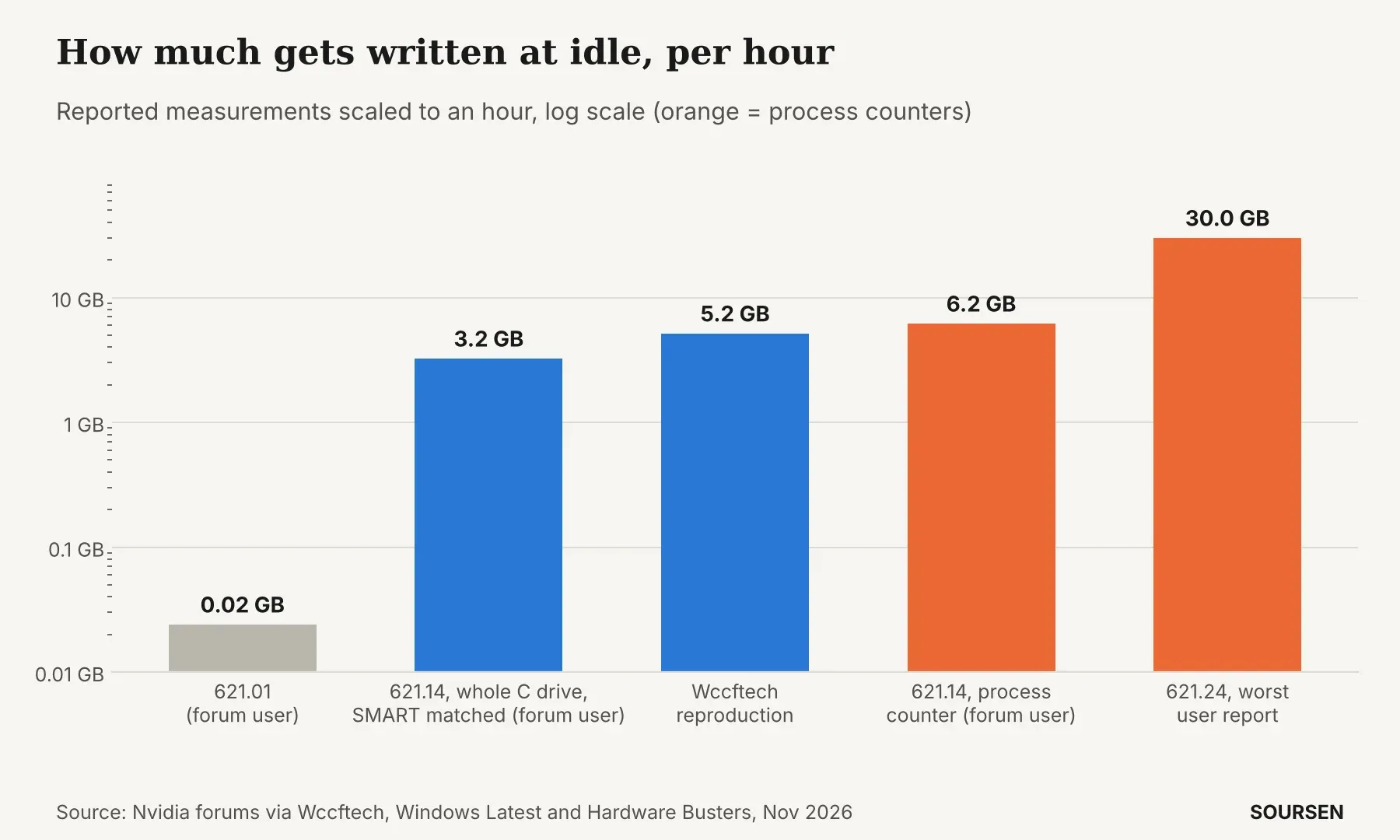
How much gets written at idle, per hour. Reported measurements scaled to an hourly rate, log scale. Source: Nvidia forums via Wccftech, Windows Latest and Hardware Busters, November 2026.
Process counters need a caveat. Task Manager and Resource Monitor count what a process asks Windows to write. That figure can differ from what physically lands on the flash, because Windows caches and merges writes. Hardware Busters pointed out that per process counters measure requests, which are not the same thing as NAND wear.
The same forum user, an RTX 4070 Super owner on Windows 11 25H2 according to Windows Latest, also checked the drive itself. In that 5 minute idle window, the whole C drive took 270MB from every process combined, and the SSD’s own SMART counter for data written matched what Windows reported, per TroubleGrid’s write up. So the drive absorbed about half of what the Nvidia process asked to write, and that still works out to more than 3GB an hour.
The extremes are dramatic. One user on 621.24 logged 98GB written since their last boot, and after 5 days Task Manager showed 1.4TB of write activity from NVDisplay.Container.exe, more than 25 times every other process combined, per a write up shared on daily.dev. Those are single user reports, and they are process counter figures. TroubleGrid also notes that nobody knows yet whether 621.24 is worse than 621.14, because the 30GB an hour figure comes from 1 report using a different method on different hardware.
Some machines are fine. Posters in the same Nvidia thread report the process never showing up among Resource Monitor’s disk writers on 621.14 or 621.24. Nobody outside Nvidia knows yet which hardware or settings trigger it. Some users also report stuttering in games and video playback, and hitches in the mouse pointer, as Technobezz summarized, though nobody has shown those symptoms come from the same cause.
I did the endurance math for a typical 1TB SSD
SSDs wear out by writes. Manufacturers rate them in terabytes written, or TBW. A 1TB Samsung 990 Pro, a popular high end drive, is rated for 600TBW, a figure Hardware Busters used for its own estimate. Here is what the reported rates mean if the driver were the only extra load.
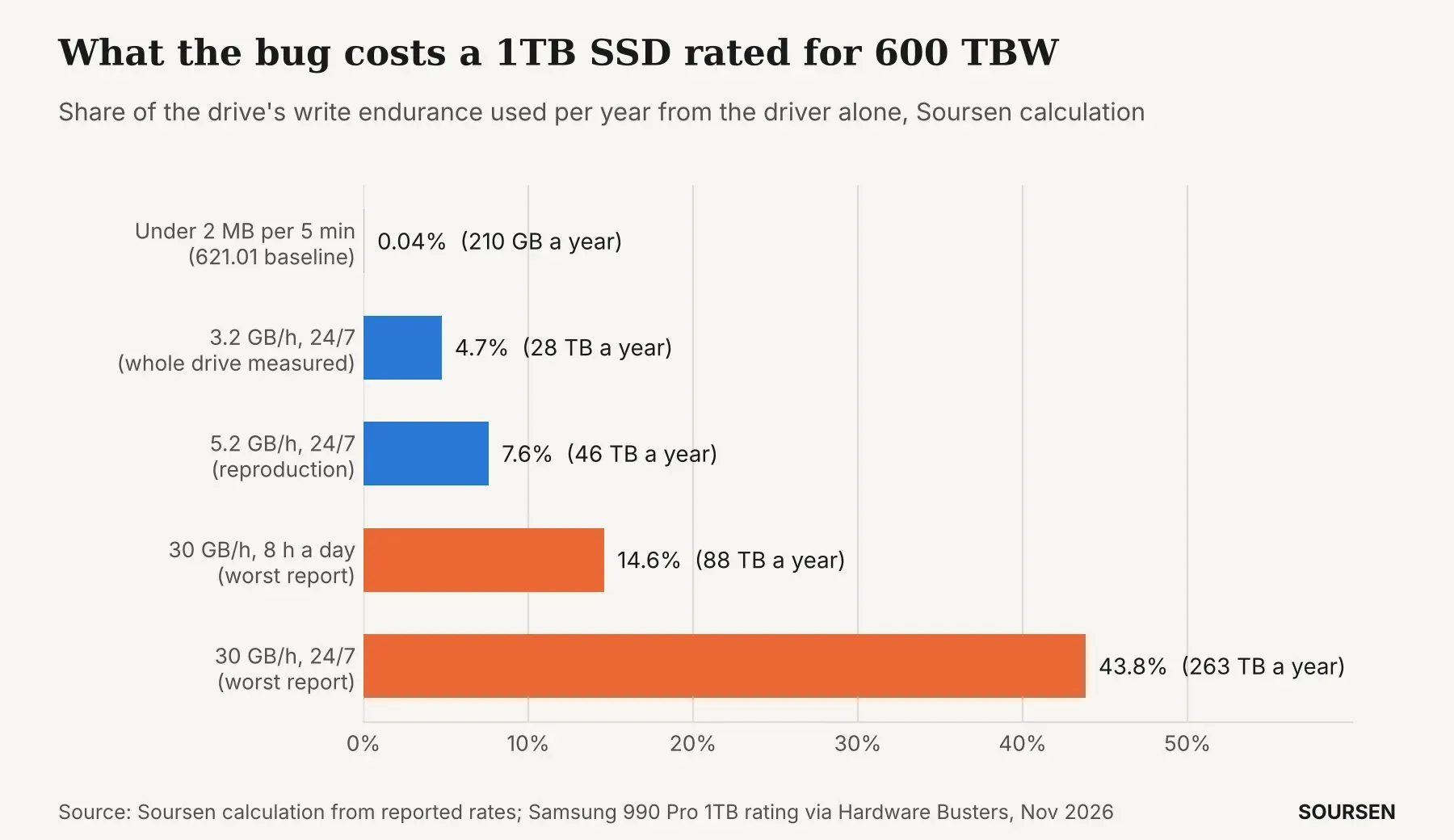
What the bug costs a 1TB SSD rated for 600 TBW. Share of the drive’s rated endurance used per year by the driver alone. Source: Soursen calculation from reported rates, November 2026.
At the 270MB per 5 minutes the whole drive took in that forum test, a PC left on all the time would write about 28TB a year, roughly 5% of that 600TBW rating, which matches the estimate Tom’s Hardware made from the same figure. At the worst reported 30GB an hour, 8 hours a day, the driver would use about 88TB a year, close to 15%. Left running around the clock at 30GB an hour, it would burn through about 263TB a year, close to half the drive’s rated endurance in 12 months.
My read is that for most people this is a slow leak and no emergency. A few weeks on an affected driver will not kill a healthy drive. It still matters. Smaller drives and cheaper QLC drives carry much lower TBW ratings, and Windows Report noted continuous unnecessary writes hit those hardest. A PC that is on all day as a home server or a download box would rack up the worst numbers.
AMD fixed almost the same bug a week earlier
The Nvidia reports landed days after AMD confirmed its own version. AMD’s External Events Utility, a process called atieclxx.exe that handles monitor detection, display hotkeys and FreeSync, was writing to the system drive around the clock on some PCs. Users reported rates between 0.3 and 5MB per second, which at the high end is more than 400GB a day, according to PCWorld. One Reddit user said the driver had cost about 1% of SSD health a month for 16 months, a claim nobody has verified, and another user on X logged 19.5GB written by the process in 12 hours, per PC Gamer.
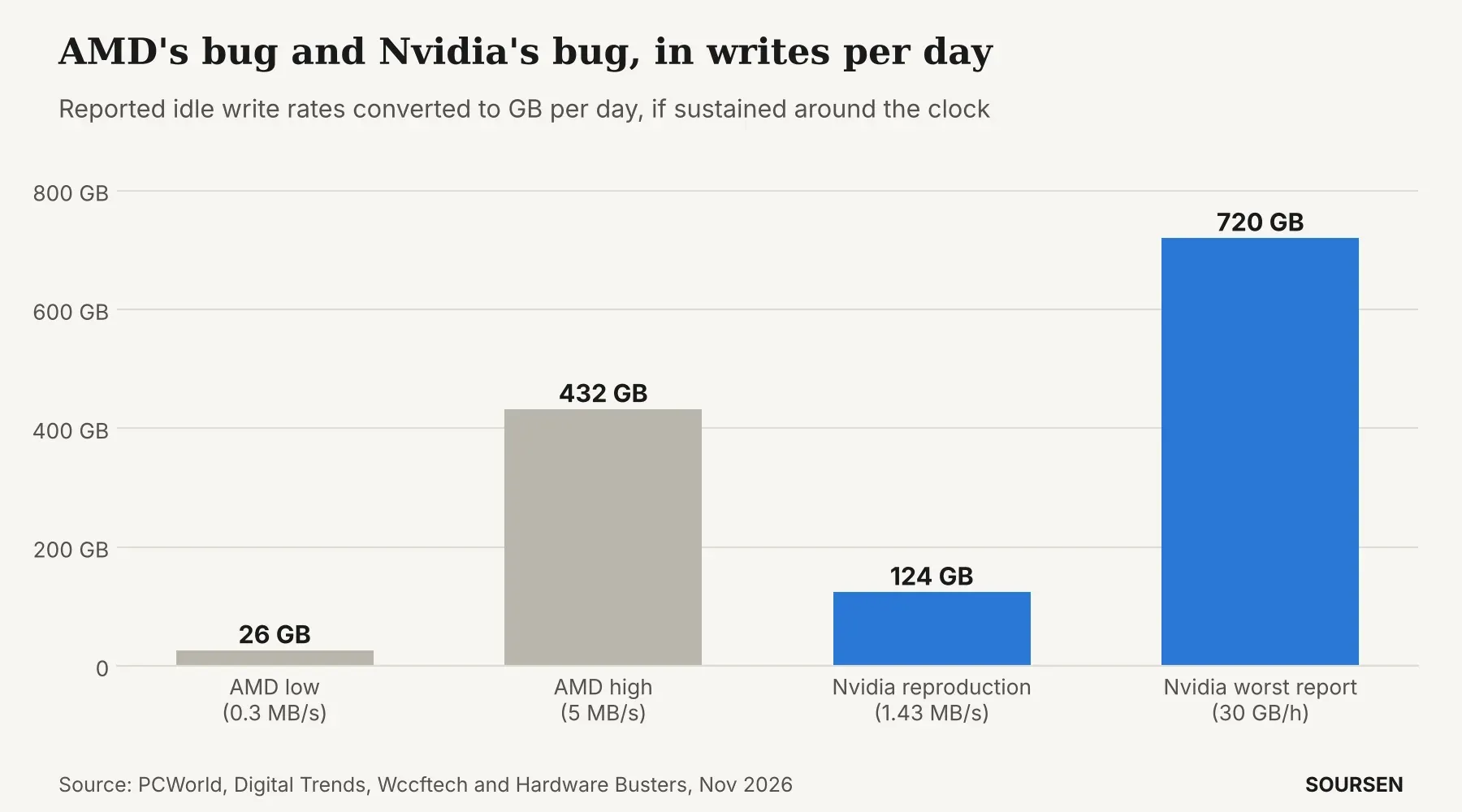
AMD’s bug and Nvidia’s bug, in writes per day. Reported idle write rates converted to a daily total. Source: PCWorld, Digital Trends, Wccftech and Hardware Busters, November 2026.
The bugs look alike in Task Manager and work differently underneath. AMD’s process repeatedly copied its own executable, a 677KB file, about once a second on one test PC, according to an analysis by Kami Labs, while Nvidia’s process rewrites a log. The AMD fix does nothing for the Nvidia bug. AMD handled its version quickly. A company representative on Reddit attributed the problem to an interaction between the External Events Utility and Microsoft’s PCIe filter driver, as DLCompare reported. On November 12, AMD released optional driver Adrenalin 26.11.1, which fixes excessive writes to the system drive at idle on Radeon RX 7000 cards and newer, plus extra writes when moving or resizing windows, according to TweakTown.
Nvidia shipped a similar bug in 2021 and is silent this time
This is not new territory for Nvidia. In August 2021, its 471.96 driver listed a fix for an issue where NVDisplay.Container.exe constantly wrote data to C:\ProgramData\NVIDIA Corporation\nvtopps\nvtopps.db3, under bug ID 3350171, per the release notes posted on TechPowerUp. Same process, same folder, different file. Back then, a Tom’s Hardware forum user noticed the total written to a 500GB Samsung 850 Evo climbing for no obvious reason.
TroubleGrid, the site whose investigation most outlets cite, also lists older and milder reports of the same kind of logging on drivers 471.41, 471.68 and 528.79 and on Studio driver 572.16, as reposted on the Level1Techs forum. The details in TroubleGrid’s list are worth reading. A Microsoft Q&A reply on driver 471.68 reported 4TB written in 40 days, about 100GB a day. A Super User question from February 2025, on Studio driver 572.16 with an RTX 3080 laptop, reported about 100GB a day and remains unanswered. A Dell XPS 15 owner with a GTX 1050 Ti Max-Q saw the log pass 7MB within a couple of hours in January 2025 and avoided it only by going back to Dell’s own 528.79 driver. A GeForce forum thread titled “Driver excessively writing to nvlog.nvlgstg” has collected 8 or more affected users over about 2 years, including one who reported about 1TB in 10 days, with no reply from Nvidia. One user in that thread said installing the driver through Windows Update avoided the problem.
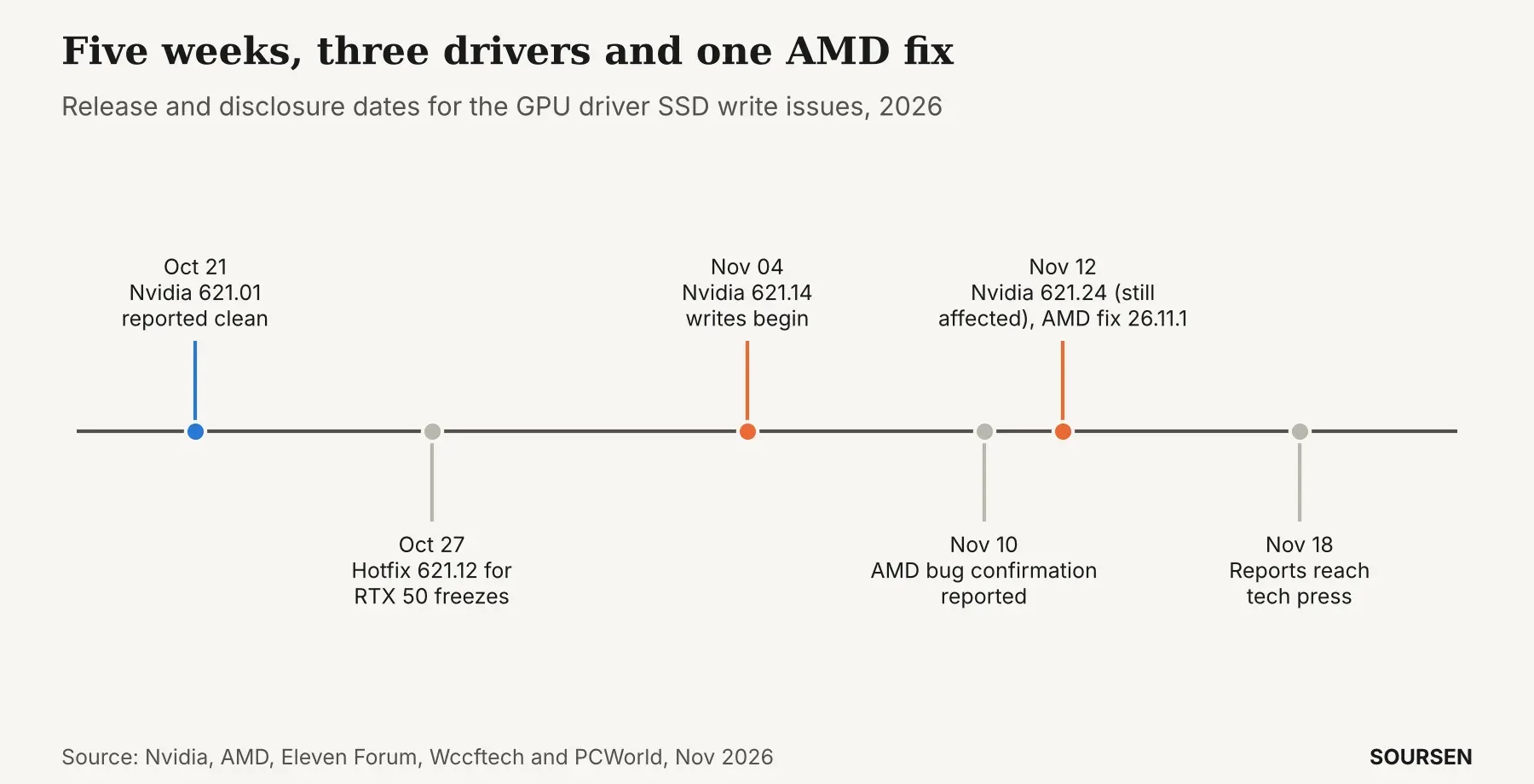
Five weeks, three drivers and one AMD fix. Release and disclosure dates for the GPU driver write issues. Source: Nvidia, AMD, Eleven Forum, Wccftech and PCWorld, November 2026.
As of this writing, Nvidia has not acknowledged the reports. The 621.24 release notes, dated November 12, list open issues as “N/A,” according to TroubleGrid. The fixed issues section names only 2 items, one for Chaos Vantage and one for DJI video colors in Windows Photos, and the document never mentions disk writes, logs, nvtopps or the Display Container service. I would like to see the company at least add it to the known issues list. AMD’s quick confirmation took a lot of the panic out of its version of this story.
How to check whether your PC is affected
The quickest check takes 5 minutes. Press Windows and R, type resmon and open the Disk tab. Leave the PC idle and look under Disk Activity for NVDisplay.Container.exe writing to the nvlog.nvlgstg file every few seconds. If the process does not appear at all, it is not writing much. A second quick tell is the file itself. Open the nvtopps\nct folder in File Explorer and refresh. On an affected PC, the Date modified time on nvlog.nvlgstg changes every few seconds.
For a running total, open Task Manager, go to the Details tab, right click a column header, choose Select columns and add I/O write bytes. Find NVDisplay.Container.exe and note the number, then check again after 10 or 20 minutes of idle. A few megabytes is normal. Hundreds of megabytes is the bug.
If you want to measure what your drive has absorbed, read its own counter. Tools like CrystalDiskInfo or your SSD maker’s utility, such as Samsung Magician, show total host writes from the drive’s SMART data. Note the figure, leave the PC idle for an hour and check again. Turn off Nvidia’s Instant Replay first if you use it, since screen recording features can write to disk by design and muddy the result.
If the busy process turns out to be something else, the Nvidia bug is not your problem. TroubleGrid lists the usual idle writers as Windows Search indexing, SysMain, antivirus scans, Windows Update, browser caches, Steam shader pre caching, cloud sync clients and game launcher logs. If the writer is atieclxx.exe, you have the AMD bug, which TroubleGrid says can show up even on a PC with an Nvidia card.
Every fix has a trade off
Rolling back to driver 621.01 is the fix most users report working, and it stops the writes. There is a catch for newer cards. Nvidia released hotfix driver 621.12 on October 27 to fix video playback freezes and black screens on some RTX 50 series GPUs after 621.01, as HotHardware reported, and Windows Latest found no report yet testing whether 621.12 has the write problem. RTX 50 owners face a choice between a known display bug and a known write bug.
How you roll back matters. TroubleGrid points to Nvidia’s own release notes, which say not to use Windows’ Roll Back Driver option because it does not reliably restore earlier files. The safer route is to download the 621.01 installer first, uninstall the current driver from Settings, Apps, Installed apps, restart and run the 621.01 setup with a clean installation selected. Then stop Windows Update from pushing the newer driver back by declining optional driver updates. One user measured 260KB of log writes over an hour after rolling back. The cost is that you lose Game Ready support for games released after 621.01.
The quick relief is to stop the NVIDIA Display Container LS service, delete nvlog.nvlgstg and start the service again. A test on 621.14 by the forum user Andergraude cut the process’s writes from 515MB to 48MB per 5 minutes, about 91%, and total writes to the C drive fell from 270MB to 145MB, per TroubleGrid. The file grows back, so this only buys time. MakeUseOf also suggests setting the service to Manual and starting it only when you need the Nvidia Control Panel. While it is stopped you cannot change G-SYNC, color, scaling, resolution overrides or per game 3D settings, though settings you already applied stay in place. Disabling the service outright stops the writes and also takes away the NVIDIA Control Panel and the Nvidia App. A clean reinstall of the same driver does not seem to help, since 3 users reported no improvement after using Display Driver Uninstaller. Making the log file read only, a trick circulating in videos about this bug, is not reported to work, and deleting the whole nvtopps folder does not help either, according to TroubleGrid. Most fix reports come from 1 or 2 users each, and Nvidia has confirmed none of them.
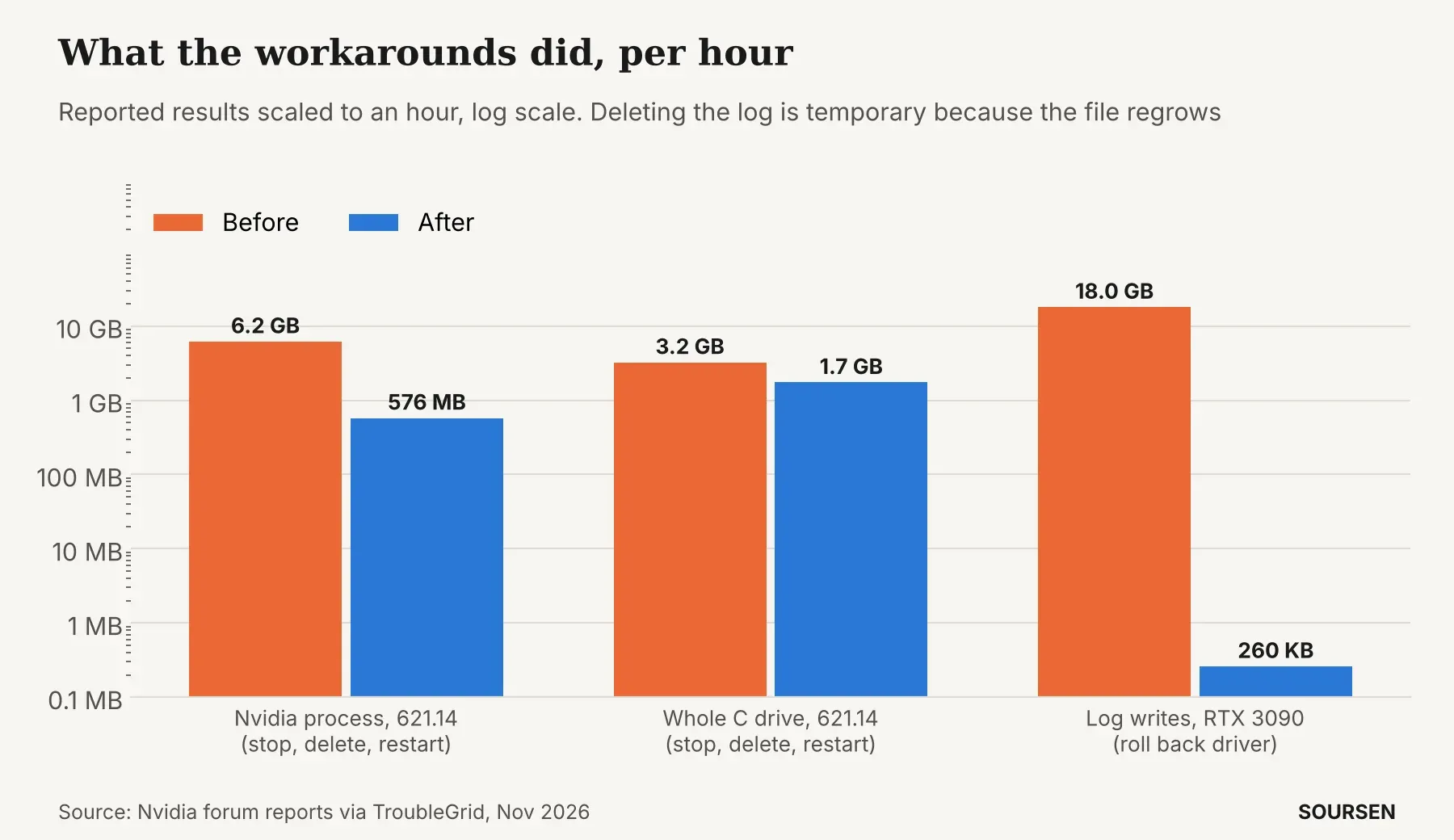
What the workarounds did, per hour. Reported results before and after each workaround, log scale. Source: Nvidia forum reports via TroubleGrid, November 2026.
I would roll back to 621.01 on an RTX 40 or older card, and on an RTX 50 card I would try the service workaround and watch Nvidia’s next release notes for a fix. Avoid editing permissions on driver files or deleting folders beyond that single log file. Workarounds that stop Nvidia’s services from writing their own files can break things in ways that are hard to trace later.
SSD prices make every wasted write sting
The timing has made people angry, and I understand why. Contract prices for some SSDs jumped 303% in a year as AI data centers soaked up NAND flash supply, Notebookcheck reported in October. Phison’s CEO said the price of a TLC 1 terabit NAND die doubled in 6 months from $4.80 to $10.70, per TweakTown. A Samsung 870 Evo 1TB cost 51% more in January 2026 than in November 2025, according to Tom’s Hardware.
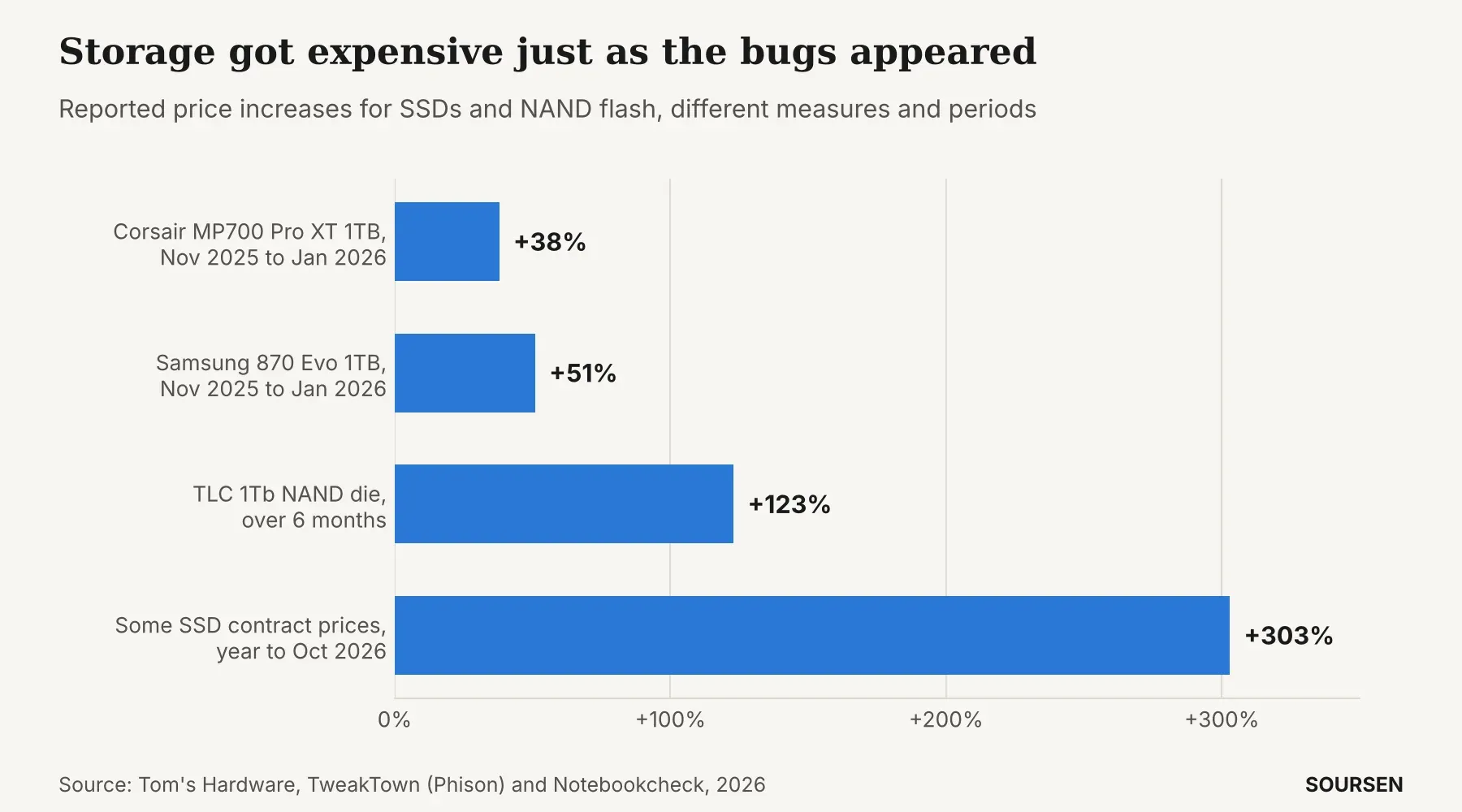
Storage got expensive just as the bugs appeared. Reported price increases for SSDs and NAND flash over different periods. Source: Tom’s Hardware, TweakTown and Notebookcheck, 2026.
That context has fed a theory on social media. The 2 companies that make nearly every PC graphics card both shipped drivers that wear out SSDs, both are pushing AI, so maybe it is deliberate, or maybe both companies vibe coded their drivers.
I do not buy the deliberate version, and the evidence points the other way. The 2 bugs live in different components with different causes. AMD attributed its version to its event utility interacting with a Microsoft driver, while Nvidia’s appears to come from a logging service. Nvidia shipped a near identical bug in the same folder in 2021, years before this shortage. AMD fixed its version within days of confirming it. The companies earning record profits from expensive flash are the memory makers. Micron said its data center SSD revenue approached $10 billion in a single quarter, according to Tech Insider. As for vibe coding, there is no public evidence about how either bug was written, so I would leave that one alone.
The simpler explanation fits better. GPU drivers now ship with large background services, telemetry, overlays and logging, and every one of those services can misbehave. Few users ever look at what those background processes do to their drives.
2 things from this generalize
The first is that background services deserve the same scrutiny as foreground apps. Both of these bugs sat in helpers most users never knew existed, and both were found by owners who noticed their drives working when they should have been idle.
The second is that process counters and drive counters answer different questions. A process can request 515MB while the drive absorbs 270MB. If you want to know whether something is wearing out your SSD, read the SSD’s own SMART data, and treat viral screenshots of Task Manager as a reason to check.
This week, open CrystalDiskInfo or your SSD maker’s tool, write down your drive’s total host writes, and check it again after a full idle day to see how much your PC writes when you are not using it.
Sources
- Nvidia GeForce Forums, Continuous writing of gigabytes to SSD to nvtopps file, 621.24nvidia.com. Accessed 20 November 2026.
- Guru3D, Nvidia GeForce driver 621.24 reported to write up to 30 GB per hourguru3d.com. Accessed 20 November 2026.
- Wccftech, Nvidia GPU drivers reportedly writing up to 30GB per hour to SSDswccftech.com. Accessed 20 November 2026.
- Pasquale Pillitteri, users report Nvidia 621.24 driver bugpasqualepillitteri.it. Accessed 20 November 2026.
- TechPowerUp, latest Nvidia drivers might cause excessive SSD writingtechpowerup.com. Accessed 20 November 2026.
- Hardware Busters, GeForce driver bug reportedly piles idle writes onto SSDshwbusters.com. Accessed 20 November 2026.
- Windows Latest, First AMD, now Nvidiawindowslatest.com. Accessed 20 November 2026.
- daily.dev, Nvidia's newest driver has been quietly writing gigabytes to my SSDdaily.dev. Accessed 20 November 2026.
- Technobezz, Nvidia drivers keep writing to SSDs while PCs sit idletechnobezz.com. Accessed 20 November 2026.
- Windows Report, AMD confirms Radeon driver bug that may shorten SSD lifespanwindowsreport.com. Accessed 20 November 2026.
- PCWorld, AMD confirms a bug in its driverspcworld.com. Accessed 20 November 2026.
- PC Gamer, AMD users report a misfiring utility eating SSD healthpcgamer.com. Accessed 20 November 2026.
- Digital Trends, an AMD Radeon driver bug is quietly hammering your SSDdigitaltrends.com. Accessed 20 November 2026.
- DLCompare, AMD promises a fix for Radeon driver issuedlcompare.com. Accessed 20 November 2026.
- TweakTown, Adrenalin 26.11.1 addresses the excessive SSD writes issuetweaktown.com. Accessed 20 November 2026.
- TechPowerUp, Nvidia releases GeForce 471.96 Game Ready drivers (2021)techpowerup.com. Accessed 20 November 2026.
- Tom's Hardware Forums, Nvidia Container constantly writing TB to C drive (2021)forums.tomshardware.com. Accessed 20 November 2026.
- Level1Techs Forum, reports of recent Nvidia drivers writing up to 30GB per hourforum.level1techs.com. Accessed 20 November 2026.
- Eleven Forum, latest Nvidia GeForce drivers for Windows 11elevenforum.com. Accessed 20 November 2026.
- TroubleGrid, Nvidia driver constantly writing to SSDtroublegrid.com. Accessed 20 November 2026.
- HotHardware, Nvidia's 621.12 hotfix targets RTX 50 display glitcheshothardware.com. Accessed 20 November 2026.
- MakeUseOf, your idle PC could be eating your SSD alivemakeuseof.com. Accessed 20 November 2026.
- Notebookcheck, SSD prices explode by 303% in a yearnotebookcheck.net. Accessed 20 November 2026.
- TweakTown, NAND flash pricing for SSDs has doubled in six monthstweaktown.com. Accessed 20 November 2026.
- Tom's Hardware, the era of the cheap 1TB SSD is overtomshardware.com. Accessed 20 November 2026.
- Tech Insider, NAND shortage and SSD prices 2026tech-insider.org. Accessed 20 November 2026.
- Kami Labs, AMD driver writes 55GB a daykami-labs.fr. Accessed 20 November 2026.
Related stories
More in AI & GPU
AI & GPU compute
Nvidia’s Board Backed Jensen Huang on Sunday. By Thursday He Was Gone.
Four days after Nvidia’s board said it had confidence in its CEO, Jensen Huang resigned. A short seller had flagged the Megaspeed connection 6 months earlier, and most of the story rests on anonymous US officials, so I separate the filed facts from the allegations.

AI & GPU compute
25 GPUs for Local AI Ranked by Value, and a 2018 Server Card Takes Top Tier
A November 2026 price snapshot grades 25 cards on dollars per gigabyte and dollars per token per second. The AMD Instinct MI50 and a used RTX 3060 take S tier, the RTX 5080 lands in F, and memory decides almost every grade.

AI & GPU compute
The Number Nobody Tells You to Check When Buying a GPU for Local AI
If you have spent any time researching GPUs for running AI models locally, you have probably heard the same advice repeated everywhere: get as much VRAM as possible. That advice is not wrong.